Integrating SAP S/4HANA Public Cloud with SAP Field Service Management (FSM) allows businesses to streamline their field service operations by creating a seamless connection between back-end systems and field service execution.
Here’s an overview of the objects that can be replicated, as well as a common use case related to the replication of a released service order or repair order into a service call in SAP FSM.
- Replicable Objects from SAP S/4HANA Public Cloud to SAP FSM
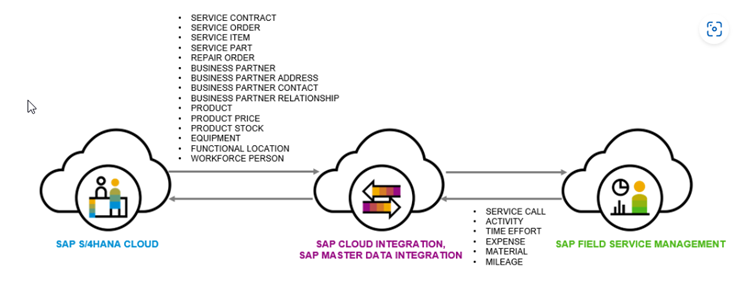
In the integration between SAP S/4HANA Cloud and SAP Field Service Management, the following objects are commonly replicated:
- Service Order: Represents a work order for field service technicians, including service requests, repairs, maintenance, and other tasks related to customer service.
- Repair Order: A specific type of service order used for repairs, typically for equipment or assets.
- Service Call: A service request triggered in SAP FSM to manage a customer issue, typically originating from a service order or repair order in SAP S/4HANA Cloud.
- Functional Locations: Locations where the service or repair activities are carried out. These are often replicated to provide service technicians with specific asset data for the service.
- Material Master: Data related to the spare parts or materials needed for service tasks.
- Service Parts: Spare parts required to complete the repair or service order.
- Technician (Employee Master): Information related to the field service technicians, such as their roles, skills, and availability.
- Customers: Customer details (e.g., customer master data), which can be synced for service call creation.
- Installed Base (IB): The list of equipment or assets installed at the customer’s site, often required for service management.
- Use Case: Replicating Released Orders to SAP FSM Service Calls
A typical use case would be the replication of a released service order or repair order from SAP S/4HANA Cloud to SAP Field Service Management as a service call. The service call is a key component for tracking and managing field service activities.
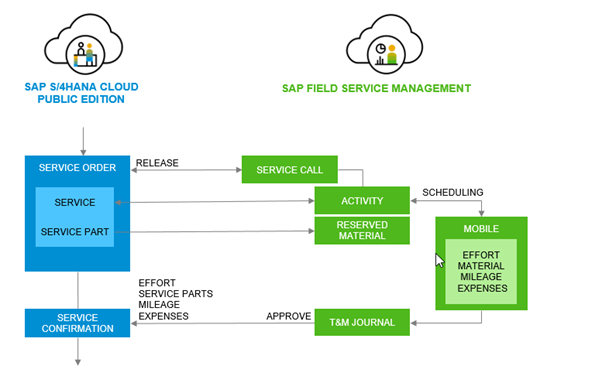
Process flow
Creation of Service or Repair Order in SAP S/4HANA Cloud:
- A service order or repair order is created in SAP S/4HANA Cloud based on customer needs, maintenance schedules, or repair requirements.
- The order is released and finalised in S/4HANA.
Replication to SAP Field Service Management:
- Once the service or repair order is released in SAP S/4HANA, it is automatically replicated into SAP FSM as a service call.
- The service call in SAP FSM inherits relevant information such as customer details, location, and service specifications from the S/4HANA order.
- It also pulls material requirements (such as spare parts or tools) and technician assignments.
Assigning a Field Service Technician:
- A field service technician is assigned to the service call based on availability, skills, and proximity to the customer.
- The technician uses a mobile app or web interface to view and manage tasks.
- Technician information and schedules are synced between the FSM and SAP S/4HANA Cloud to ensure efficient scheduling.
Field Execution:
- The technician arrives on-site and performs the necessary service, repair, or maintenance activities.
- All activities (e.g. hours worked, parts used, updates to the order) are logged in SAP Field Service Management and can be automatically updated back to SAP S/4HANA Cloud for billing, invoicing, and reporting.
Closing the Service Call:
- Upon completion of the field service activity, the service call is closed in SAP Field Service Management.
- This triggers updates in SAP S/4HANA Cloud to reflect the completion of the service or repair order, including parts used, labour hours, and any updates to the customer record or equipment/installed base.
- Advantages of Integration
- Real-Time Data Synchronisation: Data such as service orders, repair orders, and field activities are updated in real-time across both systems, ensuring that all stakeholders are working with the most up-to-date information.
- Improved Efficiency: Technicians have all the necessary information at their fingertips, reducing delays and mistakes.
- End-to-End Visibility: From order creation to service execution, both the field service team and back-office personnel have complete visibility into the status and progress of service tasks.
- Better Customer Service: Faster, streamlined service delivery improves customer satisfaction and loyalty.
- Integration Approach
Integrating SAP S/4HANA Public Cloud with SAP Field Service Management involves leveraging various integration methods to ensure data synchronisation, process flow, and real-time visibility between the two systems.
Below is a step-by-step integration approach for the replication of service orders or repair orders from SAP S/4HANA to SAP FSM:
Integration Technologies
- SAP Cloud Platform Integration (CPI): SAP CPI serves as the middleware between SAP S/4HANA Cloud and SAP FSM. It facilitates the data exchange, transformation, and routing between the two systems using pre-built integration content or custom APIs.
- OData Services: For real-time data exchange, OData services can be used to expose business data from SAP S/4HANA Cloud (such as service orders and repair orders) to SAP FSM. These services allow the seamless transfer of data between the systems.
- REST APIs: REST-based APIs in both SAP S/4HANA Cloud and SAP FSM can be used for programmatic communication. These APIs enable creating, updating, and deleting service orders, repair orders, and service calls based on the business logic and triggers defined in the system.
- IDoc (Intermediate Documents): IDocs can be used for batch processing data between SAP S/4HANA Cloud and SAP FSM, especially when dealing with large volumes of data. IDocs are typically used for transactional data such as service order details or repair data.
Data Mapping & Transformation
-
Data Structure Mapping: The fields and objects in SAP S/4HANA Cloud need to be mapped to corresponding fields in SAP FSM. For example:
Service Order → Service Call
Service Item → Activity
Employee → Person
Service Part → Reserved Material
- Data Transformation: Data transformation is required if the data formats or structures differ between SAP S/4HANA Cloud and SAP FSM. For instance, dates, timestamps, or complex structures may require adjustments to ensure compatibility across systems.
- Field Level Validation: Data validation rules should be in place to ensure that only valid data is transferred between the systems, preventing inconsistencies or errors during replication.
Data Flow Process
Step 1: Event Trigger in SAP S/4HANA Cloud
A service order or repair order is created or released in SAP S/4HANA Cloud. This action can trigger an event (using SAP Cloud Platform Integration or SAP Event Mesh) that sends the order data to the integration layer.
Step 2: Replication to SAP FSM
The event triggers the replication of the service or repair order to SAP FSM. The order is transformed into a service call in FSM. This can be done using a combination of OData, REST APIs, or IDocs to transfer the data to the corresponding service call objects in SAP FSM.
Step 3: Synchronisation of Relevant Data
Along with the order data, other relevant data, such as customer details, material requirements, functional locations, and technician information, are also transferred to SAP FSM. These ensure that the technician can execute the service call with complete and accurate information.
Step 4: Status Updates & Feedback
As the service call progresses in SAP FSM, real-time updates (such as work progress, time spent, parts used) are sent back to SAP S/4HANA Cloud. This feedback loop ensures that both systems reflect the status of the service or repair order and that billing, invoicing, and reporting in SAP S/4HANA Cloud are accurate.
Error Handling & Monitoring
- Error Handling: Errors during the integration process need to be captured and managed. SAP CPI provides tools to manage errors, such as retry mechanisms and exception handling.
- Monitoring: SAP Solution Manager or SAP Cloud Platform Monitoring can be used to monitor the integration process. This ensures that any issues, like failures in replication or data mapping errors, are detected and resolved quickly.
- Audit Trail: Maintaining an audit trail of all replicated service orders, repair orders, and service calls is crucial for tracking the integration and ensuring data integrity across both systems.
Security Considerations
- Authentication: Use secure protocols such as OAuth 2.0 to ensure both systems authenticate and authorise communication before exchanging any data.
- Data Encryption: All sensitive data being transmitted between SAP S/4HANA Cloud and SAP FSM must be encrypted (e.g., via HTTPS or SSL/TLS) to prevent unauthorised access.
- Role-Based Access Control: Ensure that only authorised users and systems have access to specific fields and functionalities, maintaining data privacy and security.
Configuration in SAP S/4HANA Cloud and SAP FSM
- In SAP S/4HANA Cloud: The relevant integration settings must be configured, such as activating the required OData services, setting up the communication arrangement, and enabling the service order or repair order replication functionality.
- In SAP Field Service Management: Configuration in FSM should include setting up service call templates, mapping of incoming data (e.g., customer, service materials, service order data), and defining the service task workflows that will be triggered once the service call is created.
Monitoring and Optimisation
- Real-Time Monitoring: Continuous monitoring of service order or repair order replication in both systems helps ensure timely intervention if necessary.
- Performance Optimisation: As integration scales, it is essential to optimise data flows and reduce latency. This may include tuning the middleware (e.g., SAP CPI) and fine-tuning API calls for optimal performance.
The integration between SAP S/4HANA Public Cloud and SAP FSM facilitates a seamless connection between back-end operations and field service execution, allowing service orders or repair orders to be efficiently replicated as service calls in SAP Field Service Management. This integration leads to better coordination, enhanced customer service, and greater operational efficiency.
As a trusted SAP partner, On Device Solutions works closely with customers to help them adapt to each release – whether it’s configuring templates, optimising planning boards, or setting up intelligent workflows.
SAP FSM continues to evolve – offering more robustness, flexibility, and user-friendliness than ever before.
Find out how SAP Field Service Management can benefit your operations
Get in touch with our SAP experts here or email: info@ondevicesolutions.com to explore how we can help you tailor SAP FSM to your unique service delivery goals.