


Field service operations are evolving rapidly as enterprises embrace Industry 4.0 technologies and connected service models.
For decades, organisations have struggled with the “last mile” of digital transformation: connecting the frontline worker to the enterprise digital thread.
While back-office systems have become highly sophisticated, field technicians frequently rely on fragmented information and on paper-based manuals. The integration of SAP Field Service Management (FSM) and TeamViewer Frontline addresses this challenge.
This powerful synergy brings Augmented Reality (AR) workflows, smart glasses, and remote assistance directly into the field, fundamentally altering how maintenance, inspection, and repair tasks are executed. By delivering contextual, step-by-step digital work instructions into the technician’s field of view, enterprises are unlocking unprecedented levels of operational excellence, safety, and customer satisfaction.
This article explores the architecture, business case, use cases, and implementation roadmap for this transformative integration.
Understanding the Core Technologies
SAP Field Service Management (FSM)
SAP FSM is a market-leading enterprise solution designed to optimise the entire field service lifecycle. It provides AI-driven scheduling, dispatching, mobile field execution, and customer self-service capabilities. SAP FSM ensures that the right technician, with the right parts and the right skills, is dispatched to the right location. However, once the technician is on-site and physically engaged with complex machinery, traditional mobile screens can become a hindrance rather than an enabler.
TeamViewer Frontline
TeamViewer Frontline is a software program designed for workers who are on their feet and using their hands, rather than sitting at a desk (like mechanics, factory workers, or field technicians).
Instead of making workers look down at a phone, tablet, or paper manual, the software runs on smart glasses. It projects important information, step-by-step instructions, and diagrams right into the worker’s field of vision. This allows them to see exactly what they need to do while keeping both hands completely free to do the physical work.
The software comes with three main tools for different types of jobs:
- Inspect: For checking equipment and performing routine maintenance.
- Make: For building products and putting things together on an assembly line.
- Assist: For calling a remote expert who can see exactly what the worker is looking at and guide them through fixing the problem.
RealWear Navigator 520
The RealWear Navigator 520 is generally described as a smart glasses device that lets field technicians work with both hands while staying fully connected to remote experts and digital workflows. No more stopping to check a manual, make a call, or wait for a senior engineer to arrive on-site; everything they need is right in their line of sight. When paired with TeamViewer Frontline, experts can see exactly what the technician sees and guide them in real time with AR annotations, turning complex, time-consuming jobs into fast, first-time fixes.
The Business Case: Why TeamViewer Frontline + SAP FSM?
Enterprise field service has traditionally operated in silos, with work order management in ERP, scheduling in planning tools, and technical knowledge trapped in the minds of senior experts. The TeamViewer Frontline integration with SAP FSM breaks down these silos by creating a single, connected service ecosystem.
It does this by embedding “See-What-I-See” remote assistance (Assist) directly into the technician’s existing SAP workflow. Instead of toggling between different apps or making unrecorded phone calls, technicians can instantly pull an expert into their SAP FSM work order via live video.
- Eliminating the “Second Truck Roll” (Improving FTFR)
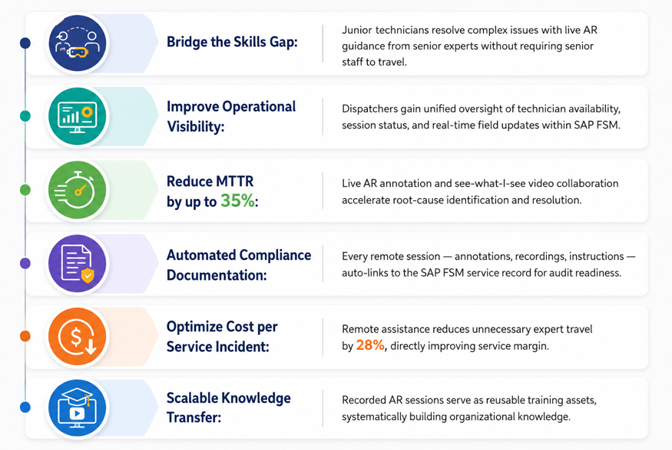
When a technician arrives on-site and faces an unexpected or highly complex issue, they traditionally must order a part, consult a manual, or leave the site to bring back a senior engineer. This causes the First-Time Fix Rate (FTFR) to plummet. With integrated Assist, the technician initiates a video call from their SAP mobile app. A remote expert can see the exact physical machine through the technician’s camera, draw digital 3D markers on the screen to point out specific valves or wires, and guide them to a resolution on the very first visit.
- Bridging the Knowledge Gap
Many field service organisations are struggling with the retirement of experts and a wave of junior technicians entering the field. This integration allows companies to centralise their veteran talent. A single senior expert sitting at a help desk can virtually “visit” five different job sites in a day via Assist, guiding newer technicians through complex repairs. It scales your best talent without spending time and money putting them on an aeroplane or in a truck.
- Automated, Audit-Ready Documentation
In a siloed environment, if a technician calls an expert on FaceTime or WhatsApp, that interaction is lost. There is no record of what was said, what was fixed, or how long it took. By launching Assist from within SAP FSM, the entire remote session is tethered to the work order. When the call ends, connection data, duration, and any screenshots taken during the remote session are automatically synced back to the SAP service ticket. This ensures perfect compliance and accurate billing with zero manual data entry.
Key Value Drivers
The TeamViewer Frontline and SAP FSM integration delivers measurable business value across four critical dimensions:
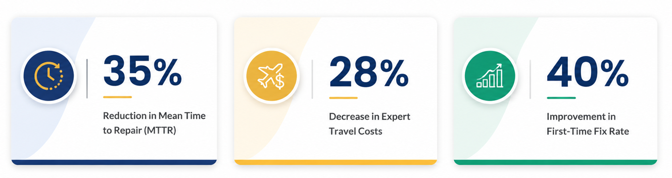
- Operational Efficiency: AR-guided remote assistance reduces Mean Time to Repair (MTTR) by up to 50% and drives first-time fix rates from the industry average of 65-70% to as high as 89%.
- Cost Reduction: Remote-first resolution eliminates costly expert travel and repeat site visits, reducing cost per incident by 25-35% and cutting post-service callbacks by up to 60%.
- Knowledge Scalability: A single senior expert can support multiple technicians simultaneously across global locations, democratising access to specialist knowledge and accelerating onboarding of junior technicians.
- Compliance and Auditability: Every AR session is automatically recorded and linked to the SAP FSM service record, creating a complete digital audit trail for compliance, warranty, and quality management purposes.
TeamViewer Frontline Augmented Reality for SAP Field Service Management
Remote Expert Assistance (Assist)
The “See-What-I-See” capability is perhaps the most immediate ROI driver.
One of the biggest advantages of integrating TeamViewer Assist AR with SAP Field Service Management (FSM) is the ability to provide instant remote expert support to field technicians.
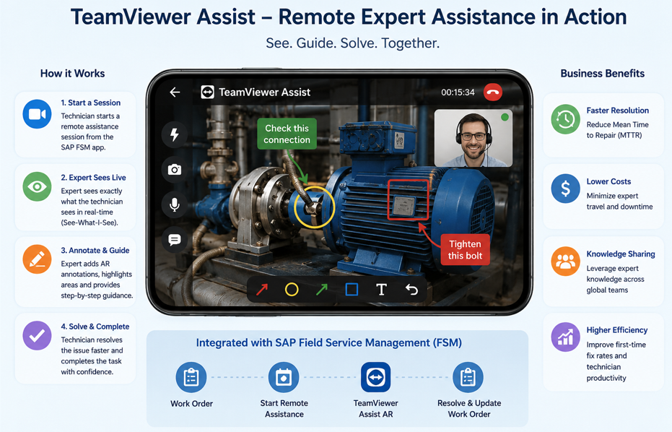
When technicians face unexpected equipment issues or complex service tasks, they can launch a live remote assistance session directly from the SAP FSM mobile application. Using the “See-What-I-See” capability, remote experts can view the technician’s live camera feed in real time and guide them step-by-step.
Experts can:
- Draw AR annotations directly on the technician’s screen
- Highlight components or problem areas
- Share technical instructions and schematics
- Support troubleshooting remotely without travelling onsite
This approach helps organisations:
- Reduce Mean Time to Repair (MTTR)
- Improve first-time fix rates
- Minimise expert travel costs
- Accelerate technician onboarding and training
- Scale expert knowledge across global teams
In simple terms, the experience and expertise of senior engineers become instantly available to technicians anywhere in the field, improving operational efficiency and service quality.
How RealWear Navigator 520 Empowers Field Technicians
RealWear Navigator 520 is a smart glasses solution worn on a hard hat. It gives field technicians the right information at the right time without having to stop work or engage their hands.
Field technicians work in tough environments, such as oil plants, factories, power grids, and more. They need both hands free, accurate information on the spot, and quick expert support.
RealWear Navigator 520 solves all of this.
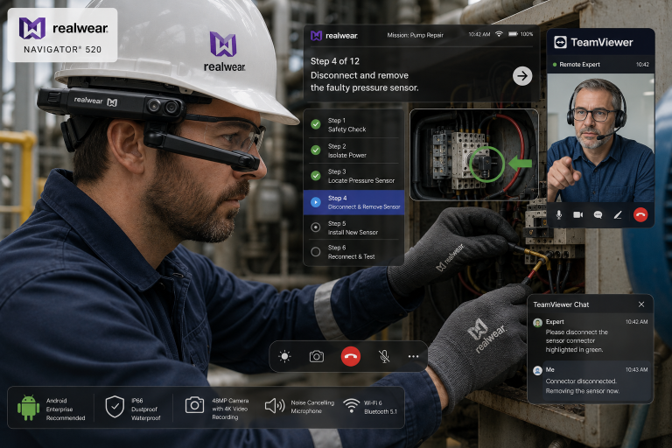
Hands Remain Free
The technician controls everything by voice, whether repairing a machine, climbing a structure, or working while wearing gloves. Both hands remain free for the task at hand.
The technician wears the device on their hard hat and controls it entirely by voice. No touching, no swiping, no need to stop work.
- Works even with gloves on
- Works in loud industrial noise up to 100 dB
- Always listening – no wake word needed
Instructions Right in Front of the Eye
Step-by-step work instructions, checklists, and manuals appear directly in the display. Even when working alone and following step-by-step instructions, the user benefits considerably from the improved display of the RealWear smart glasses.
The display sits just below the eye – showing manuals, checklists, and videos – while the technician keeps an eye on the job. This allows technicians to follow instructions without needing to hold a device.
Call an Expert Instantly – TeamViewer Assist
When a technician encounters a problem, they can connect with a remote expert using TeamViewer Assist on the RealWear glasses.
- The expert sees exactly what the technician sees via live video
- The expert can draw arrows and highlight parts on the live screen
- The technician follows instructions – hands still free
- No travel needed for the expert
Example: Junior technician gets stuck on a pump repair. A senior expert joins remotely, draws on the live view, and guides the fix in minutes.
The End-to-End Service Lifecycle: A 4-Phase Walkthrough
The integration maps seamlessly onto the four phases of the field service lifecycle, ensuring that AR-powered capabilities enhance – rather than disrupt – existing operational workflows.
| 01
PHASE |
Intelligent Scheduling and Dispatch
Service requests flow from SAP S/4HANA into the FSM planning board. Dispatchers assign primary and supporting technicians in a single action. ▸ Service call replicated in real-time on the FSM dispatching board ▸ Supporting a remote expert assigned alongside the primary field technician ▸ TeamViewer session auto-created and linked to the service activity – zero manual coordination ▸ Technician receives work order, customer details, and session link on their mobile device |
| 02
PHASE |
On-Site Execution and Inventory Validation
The field technician arrives equipped with full digital context: work order details, service history, reserved parts, and AR-session-access. ▸ SAP FSM Mobile App provides complete activity and equipment history ▸ Technician validates reserved materials and confirms pick-up before commencing work ▸ Status updates (Travelling → On-Site → Working) provide real-time dispatcher visibility ▸ Work instructions and safety procedures are accessible directly from the mobile app |
| 03
PHASE |
AR-Assisted Remote Collaboration
When the technician encounters a complex issue, the TeamViewer Assist AR session activates – connecting them instantly to a remote expert. ▸ Technician launches the session from within the FSM Mobile App via the customer link ▸ Expert joins the live “See-What-I-See” session through a web browser – no software installation is required ▸ Expert uses AR annotations, a laser pointer, and freeze-frame to highlight components and guide repairs ▸ Text recognition automatically identifies labels, serial numbers, and error codes ▸ Participants list confirms all connected parties; session is recorded automatically |
| 04
PHASE |
Seamless Documentation and Service Closure
Once the repair is complete, all session data and service information are automatically synchronised back into SAP FSM. ▸ Session recordings, AR annotations, and technician notes attached to the service ticket ▸ Technician logs chargeable time and materials within the FSM Mobile App ▸ Service report generated digitally; customer provides an on-screen signature for sign-off ▸ Complete service history – including AR session artefacts – available for future analysis, warranty claims, and compliance audits |
Industry Use Cases
The TeamViewer Frontline + SAP FSM integration delivers measurable value across a broad range of industrial sectors:
| Industry | Primary Use Case | Key Benefit |
| Manufacturing | AR-guided machine troubleshooting and preventive maintenance | Reduced line downtime; junior tech handles complex repairs with expert AR support |
| Energy & Utilities | Remote inspection of substations and remote infrastructure | 28% reduction in expert site visits; improved safety compliance |
| Oil & Gas | Guided valve assembly and equipment calibration in hazardous zones | The need for a senior expert in restricted areas is eliminated; a full audit trail |
| Medical Devices | Smart-glass-enabled device installation and compliance verification | Hands-free operation in sterile environments; auto-documentation for FDA compliance |
| Telecommunications | Tower equipment diagnosis and network hardware replacement | Faster fault isolation; first-time fix rate improved by 38% |
| HVAC & Building Services | Complex system commissioning with digital work instructions | Standardised process adherence; 60% reduction in post-service callbacks |
| Aerospace & Defence | Maintenance, Repair and Overhaul (MRO) with AR overlay on components | Error reduction in safety-critical repairs; complete digital traceability. |
Real-World Impact: Case Study Highlights
|
CASE STUDY | BMW Group — RealWear + TeamViewer Frontline Deployment Automotive After-Sales Service |
| Challenge: As automotive technology grew more complex, BMW’s after-sales service teams faced increasing challenges. Extended maintenance times threatened customer satisfaction across 347 BMW Centres and selected MINI dealerships in North America. Local technicians needed faster access to expert knowledge without waiting for engineers to travel on-site.
Solution: BMW deployed RealWear HMT-1 smart glasses running TeamViewer Assist across all 347 BMW Centres and selected MINI Dealers. Technicians could access technical documents hands-free and connect instantly with remote BMW experts via live bi-directional video, with AR annotations overlaid on the live camera feed. Results: Some repairs completed up to 75% faster; significant reduction in BMW expert travel for on-site mentoring; technicians collaborate in real-time with remote experts, eliminating lengthy email and phone exchanges. “By solving issues faster, we get customers back into their cars sooner,” – Claus Eberhart, VP Aftersales, BMW of North America.
Source: BMW Case Study – RealWear.com |
|
CASE STUDY | CONA Services (Coke One North America) – Coca-Cola Bottlers Consumer Goods and Manufacturing |
| Challenge: CONA Services, the key IT provider supporting nearly 93% of Coca-Cola’s bottling operations across North America, needed to scale digital guidance and operational consistency across a vast, distributed workforce operating bottling and production facilities.
Solution: Deployed TeamViewer Frontline as a solution extension of the workplace, integrating digital guidance, process visibility, and AR-assisted workflows directly into frontline operations in partnership with SAP. Results: Faster execution, reduced errors, and better operational visibility across the bottling network. Featured as a headline case study at SAP Sapphire 2025.
Source: TeamViewer at SAP Sapphire 2025 |
Traditional Field Service vs. AR-Integrated Field Service
| Capability | Traditional Field Service | TeamViewer Frontline + SAP FSM |
| Expert Availability | Requires physical dispatch – hours or days | Instant remote AR session – seconds to connect |
| Knowledge Transfer | Ad hoc, verbal, undocumented | Recorded AR sessions; reusable training library |
| Documentation | Manual paper forms or delayed digital entry | Auto-attached to the SAP FSM record in real time |
| First-Time Fix Rate | Industry avg. 65-70% | Up to 89% with AR expert guidance |
| MTTR | Industry avg. 4-6 hours | Reduced to 2-3 hours with live AR collaboration |
| Compliance Readiness | Inconsistent; audit gaps common | Full digital trail: recordings, annotations, sign-offs |
| Technician Confidence | Dependent on individual experience level | Democratised – any tech performs at expert standard |
| Scalability | Limited by expert headcount | One expert supports multiple technicians globally |
| Cost per Incident | High – travel, time, resource contention | Reduced by 25-35% through remote-first resolution. |
Frequently Asked Questions
Q: Does this integration require a full SAP FSM implementation, or can it work with an existing setup?
A: The TeamViewer Frontline integration is designed to layer onto existing SAP FSM deployments with minimal configuration. Most enterprises complete the technical integration in 6-10 weeks. A full SAP FSM re-implementation is not required.
Q: What devices support the TeamViewer Assist AR app for field technicians?
A: The Assist AR app supports iOS and Android smartphones and tablets. For hands-free operation, it is compatible with leading enterprise smart glasses, including RealWear Navigator 520.
No proprietary hardware is required.
Q: How is data security handled during AR remote sessions?
A: All TeamViewer sessions are encrypted end-to-end using AES 256-bit encryption. Session access is controlled through SAP FSM role-based permissions. Recordings are stored in a compliant cloud environment and automatically linked to the FSM service record, with access governed by existing SAP security roles.
Q: Can the integration support offline or low-connectivity field environments?
A: Yes. The SAP FSM Mobile App supports offline work-order-access and data capture. TeamViewer sessions require connectivity but are optimised for low-bandwidth environments. For remote sites, 5G edge integration and Wi-Fi-equipped service vehicles are supported deployment patterns.
Q: How is data captured through hands-free workflows synchronised back to SAP?
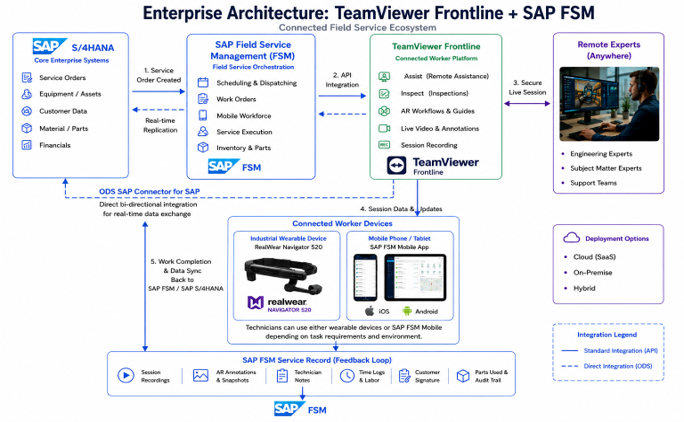
A: Data captured through TeamViewer Frontline hands-free workflows is securely synchronised to SAP FSM and SAP S/4HANA through the ODS-developed certified SAP connector, ensuring service records and workflow data are available within SAP systems.
Ready to Modernise Your Field Service Operations?
Don’t let technical complexity or geographical distance slow down your frontline workers.
Discover how TeamViewer Frontline, SAP FSM, and RealWear can help improve first-time fix rates, reduce downtime, and equip technicians with real-time AR guidance and remote expert support.
Schedule a Solution Assessment or Request a Live Demonstration to explore how TeamViewer Frontline, SAP FSM, and RealWear can enhance your field service operations.