How to Eliminate Warehouse Picking Errors with Vision Picking
The Hidden Cost of a “Minor” Picking Error
A wrong item. A missing line. The right product, wrong quantity. On paper, these look like small operational hiccups. At scale, they’re one of the most expensive problems in the warehouse. Every mispick sets off the same chain reaction: a return, a reshipment, a customer service call, and a dent in trust that free shipping can’t repair.
A consistent dip in order accuracy is rarely a one-off mistake – it usually signals a systemic issue in how the picker receives and interprets instructions.
A small accuracy gap compounds fast at volume. For a warehouse processing 500,000 orders a year, even a couple of percentage points of improvement translates into thousands fewer mispicked orders – each one a return, a support ticket, and a customer relationship you didn’t need to put at risk.
What’s Causing Warehouse Picking Errors?
Picking errors can happen for several reasons. In many cases, the problem is not that workers are careless, but that they work with too much information, repeat the same tasks for long periods, or rely on manual processes.
- Fatigue and repetition. Warehouse workers may become tired after long shifts, especially when performing the same picking tasks repeatedly. As concentration decreases, the chance of making a mistake increases.
Example: A worker who has been picking products for several hours may accidentally pick the wrong item or quantity.
- Warehouse layout. A warehouse with confusing aisle numbers, shelf locations, or poorly organised products can make it difficult for workers to find the correct picking location.
Example: A worker is asked to pick an item from A-12-07 but accidentally goes to A-12-08 because the locations are difficult to distinguish.
- Look-alike products. Products with similar packaging, names, or SKU numbers can be easily confused, especially when they are stored close to each other.
Example: Two products may look almost identical but have different SKUs or sizes, causing the worker to pick the wrong one.
- Inconsistent training. New or temporary workers may not have the same level of experience as regular warehouse staff. Without consistent training and clear instructions, mistakes are more likely.
Example: A new worker may know the product name but not be familiar with the warehouse’s bin locations or picking process.
- Manual, paper-based processes. When workers rely on printed pick lists, they must repeatedly look between the document and the products they are picking. This increases the possibility of missing an item, choosing the wrong product, or picking the wrong quantity.
Example: A worker reads “Pick 5 units” from a paper list but accidentally picks 6 because the quantity is not continuously visible during the task.
- Time pressure. Workers may be expected to complete orders quickly, particularly during busy periods or same-day delivery operations. Rushing can lead to missed checks and picking mistakes.
Example: During a peak period, a worker may quickly pick an item without carefully checking the SKU or quantity.
Why the Usual Fixes Don’t Close the Gap
Most warehouses already have a toolkit for this: paper pick lists, handheld barcode or RF scanners, tighter layouts, written SOPs, extra training, second checks before goods leave the building.
None of it is wasted effort; most operations should already be doing all of it.
But every one of these approaches shares the same blind spot: the picker still must stop, look at something, and interpret it correctly – repeatedly, shift after shift.
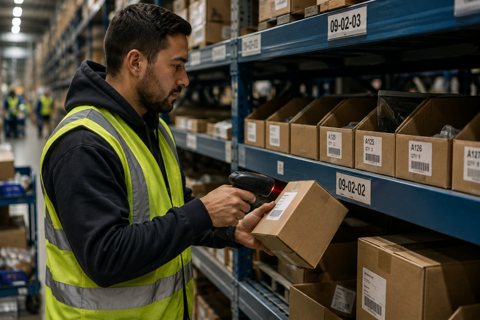
A barcode scan can validate the item or location at the point of pick, but it still requires the picker to interact with a separate handheld device. A better layout reduces confusion but still depends on the picker reading and remembering it correctly under pressure.
What Is Vision Picking?
Vision Picking guides warehouse pickers, placing the instruction for each task – the bin location, the product, and the quantity – directly in the picker’s line of sight, using a wearable headset rather than a handheld scanner, a paper list, or a cart-mounted screen. In practice, that means two things working together:
- RealWear – the wearable hardware and visual display, worn on the head so the instruction is always where the picker is already looking.
- TeamViewer Frontline – the software running on it – the visual picking workflow that decides what instruction to show, when, and confirms it once the pick is complete.
Voice contributes too, but only as a hands-free way of moving through that visual workflow, not as the method itself.
Worth clarifying, since the terms often get mixed up:
- Voice Picking – instructions are read aloud to the picker.
- Pick-to-Light – pickers are limited to fixed, pre-wired bins.
- Vision Picking – the picker sees the instruction on a display and uses voice to move through it hands-free.
The Hardware: How RealWear Enables Hands-Free Picking
RealWear is the hardware layer. It’s a rugged headset built for industrial floors rather than an office or warehouse desk – designed to cope with noise, dust, and PPE.
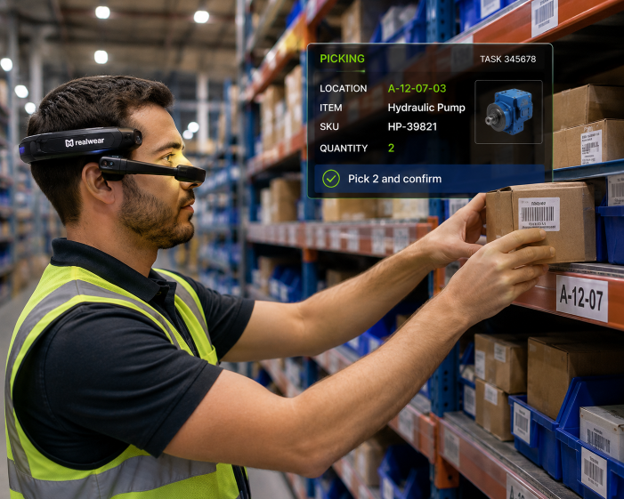
The display sits just below the picker’s line of sight, showing the instruction visually without blocking their view of the shelf, the forklift, or anyone around them.
RealWear Headset Displaying Vision Picking Instructions
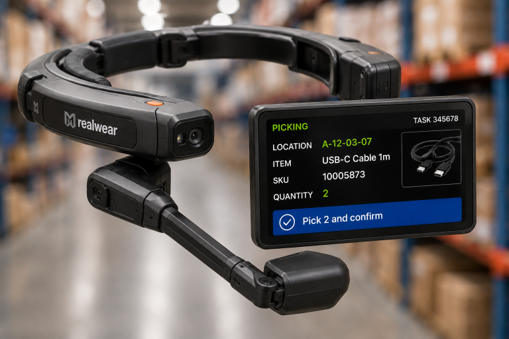
Because the device is worn rather than held, both hands stay free for the product itself. Moving between instructions, confirming a pick, or asking for help is done by voice command – not by typing or tapping a touchscreen with a gloved hand.
Voice is the control mechanism that keeps hands free; the picking instruction itself is something the picker reads on the display, not something read aloud.
RealWear pairs with the same barcode or RFID scanning accessories many warehouses already use, so a physical scan can still happen as part of the workflow, but without the picker holding a separate handheld device.
The Software: How TeamViewer Frontline Guides the Picker
TeamViewer Frontline is the software layer running on the headset and a platform of purpose-built modules, not a single tool. Two solutions matter here.
- Frontline Pick – the module that runs the picking workflow itself. Frontline provides no-code tools for configuring and adapting that workflow, and it receives the relevant warehouse task information from the SAP environment through the configured integration layer, so the instruction shown to the picker matches what SAP expects for that order line.
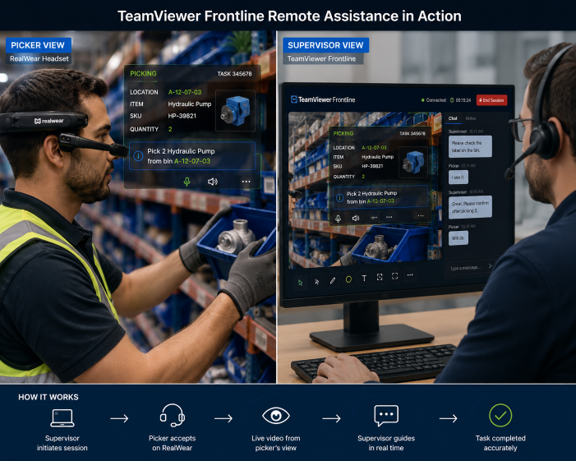
- Frontline Assist – a connected module for live remote support. If a picker runs into something the workflow doesn’t cover, a supervisor or expert can open a live session and see exactly what the picker’s headset sees – talking them through it or annotating directly on their view, without leaving their desk.
Both run on the same headset and the same Frontline platform, so a warehouse doesn’t need separate systems for day-to-day picking and for the moments someone needs help.
Built to Run on Top of SAP – Not Instead of It
Vision Picking can work with the SAP warehouse environment organisations already use, helping bring warehouse tasks and instructions directly to the worker through RealWear and TeamViewer Frontline.
On Device Solutions supports integration with SAP ERP WM/MM and SAP Extended Warehouse Management (EWM) across both SAP ECC and SAP S/4HANA environments. This allows organisations to use Vision Picking alongside their existing SAP warehouse processes rather than replacing the systems that manage their inventory and warehouse operations.
In a typical setup, SAP provides the relevant warehouse task information, such as the product, quantity, and storage location. Through the configured integration, TeamViewer Frontline uses this information to present the appropriate visual picking instructions on the worker’s RealWear device.
This means SAP remains the source of warehouse and inventory information, while RealWear provides the wearable visual interface and TeamViewer Frontline delivers the guided picking workflow.
At On Device Solutions, we help organisations design and implement these integrations around their existing SAP landscape, supporting the journey from process design and integration through testing and go-live.
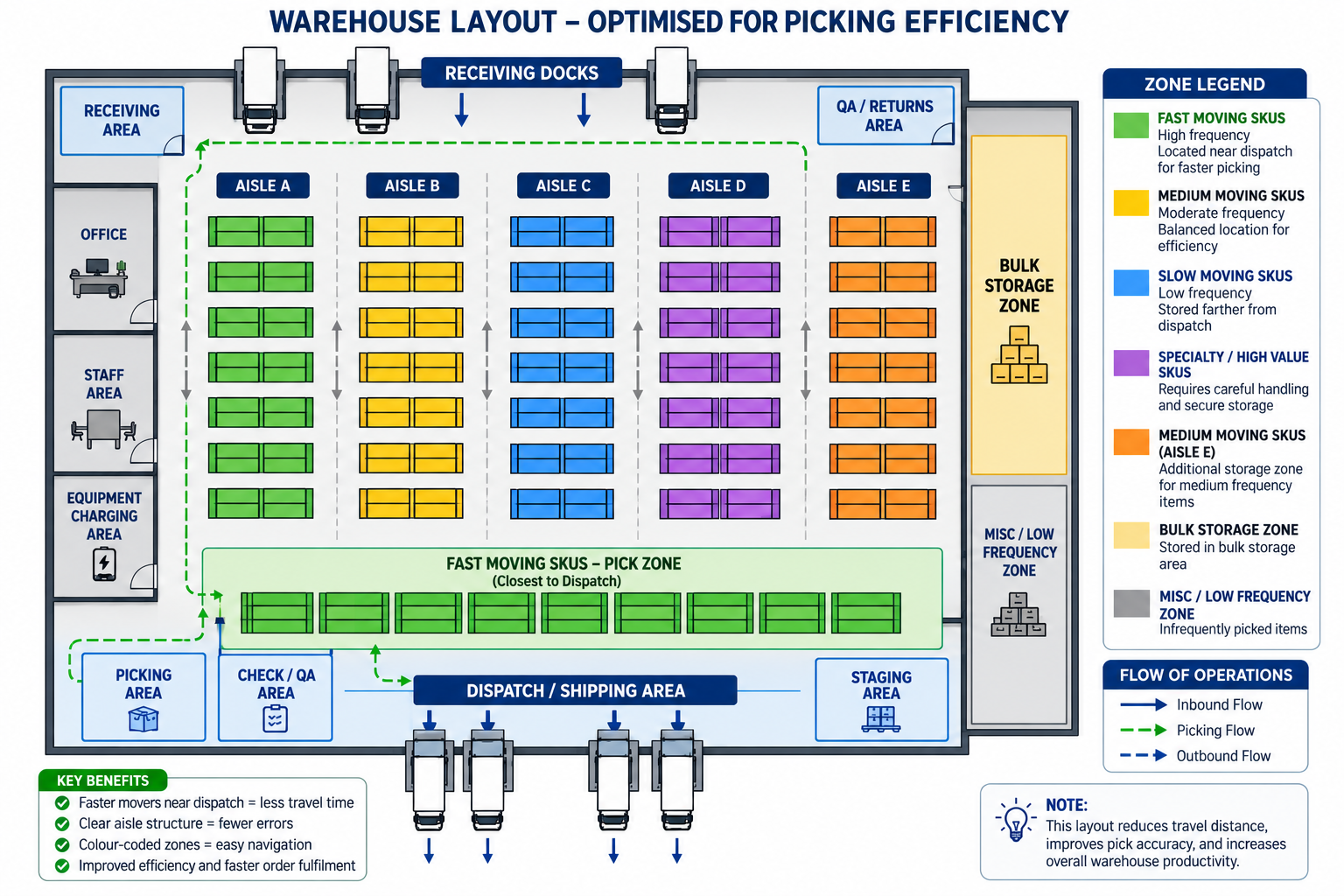
Optimising Warehouse Layout for Picking
A well-organised warehouse can reduce unnecessary travel and make picking locations easier to identify. Clear aisle numbering, logical product placement, and defined picking zones help workers find the right location faster and with fewer errors.
Mapping the Fix to Every Root Cause
Vision Picking doesn’t patch a single weak spot – mapped against the root causes covered earlier, it addresses each one directly rather than partially:
- Fatigue and repetition – the instruction is always in view, so there’s nothing to remember or re-check from a separate device, reducing the mental load that builds up over a shift.
- Warehouse layout – the exact bin and aisle are shown for every task, removing reliance on memorising a layout or reading a printed map.
- Look-alike products – the SKU, product name, and quantity are shown together on the same task, cutting down the chance of confusing near-identical items.
- Inconsistent training – a guided, step-by-step workflow means that new or agency staff can follow the same process as experienced pickers from day one.
- Manual, paper-based processes – the paper list is replaced entirely with a live, digital instruction tied to actual SAP stock data.
- Time pressure – confirmation happens in place, hands-free, so mismatches are flagged immediately rather than discovered downstream.
Proof It Works: Coca-Cola HBC
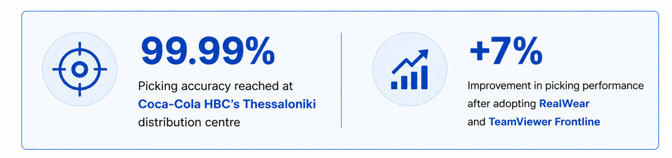
Set against the cost of picking errors, even a modest accuracy improvement compounds quickly at volume: fewer mispicks mean fewer returns, fewer support tickets, and less time spent by supervisors investigating what went wrong after the fact – rather than preventing it in the first place.
Frequently Asked Questions
What accuracy improvement can we realistically expect?
Results vary by operation. Coca-Cola HBC reported picking accuracy of up to 99.99% after adopting RealWear and TeamViewer Frontline. Actual results depend on your starting accuracy, SKU complexity, and processes.
Do we need a full WMS, or can SAP handle this?
Vision Picking can work with existing SAP warehouse environments, including SAP ERP Warehouse Management (WM) and Materials Management (MM), as well as SAP Extended Warehouse Management (EWM), across SAP ECC and SAP S/4HANA. TeamViewer Frontline integrates through the configured integration layer, allowing warehouse tasks and picking instructions to be presented on the RealWear device without replacing the existing SAP warehouse system.
How disruptive is it to roll out Vision Picking?
Vision Picking can be introduced through a focused pilot rather than a full warehouse-wide rollout. Start with a small number of RealWear devices and one picking zone or shift, measure the results, and expand from there.
Where should we start?
Start with a picking zone or shift where errors, training time, or worker efficiency are a known challenge. A small pilot lets you measure accuracy, productivity, and training improvements before scaling.
How do RealWear and TeamViewer Frontline work together?
RealWear provides the wearable device and visual display, while TeamViewer Frontline provides the guided picking workflow. Together, they deliver SAP-driven picking instructions directly in the worker’s line of sight while keeping both hands free.
Can Vision Picking work with our existing barcode or RFID processes?
Yes. Existing barcode or RFID scanning can be incorporated into the workflow where required, while the picker continues to use the RealWear headset rather than a separate handheld device.
Ready to Eliminate Picking Errors in Your Warehouse?
Picking errors can affect accuracy, productivity, and customer satisfaction.
Vision Picking with RealWear and TeamViewer Frontline helps put guided picking instructions directly in the worker’s line of sight while keeping both hands free.
On Device Solutions can help you explore how Vision Picking can integrate with your existing SAP ERP Warehouse Management (WM), Materials Management (MM), or SAP Extended Warehouse Management (EWM) environment across SAP ECC and SAP S/4HANA.
Ready to explore Vision Picking for your warehouse?
Speak to our team about your warehouse processes and how Vision Picking with RealWear and TeamViewer Frontline could support your operations.