What Is the SAP Credential Store?
SAP Credential Store provides a repository for passwords, keys, and keyrings for applications running on SAP BTP. It enables applications to retrieve credentials and use them for authentication with external services or for cryptographic operations and TLS communication. SAP Credential Store is exposed to applications via a REST API.
Key Benefits of the Service
- Create, store and manage cryptographic credentials, which your SAP BTP applications can use to access external services.
- Provide higher levels of security by using multi-version cryptographic keys to encrypt or decrypt other cryptographic keys.
- Share service instances between spaces or subaccounts.
Key Features of SAP Credential Store
- Store credentials
Use the repository to store passwords, cryptographic keys and keyrings for business applications running on Cloud Foundry and Kyma.
- Retrieve credentials
Retrieve passwords, cryptographic keys and keyrings for authentication with external services.
- Manage service instances
Create, bind, and share service instances using the SAP BTP Cockpit or the Cloud Foundry Command Line Interface (CF CLI).
- Create service keys
Create a service key to use a service instance from an external application or from an application deployed in another space.
- Encrypt data with your own keys
Control the encryption keys for data stored in the SAP Credential Store using the SAP Data Custodian service.
Support Environment
SAP Credential Store is available in the following environments:
- Cloud Foundry Environment
- Kyma Environment
Why Use SAP Credential Store Instead of Environment Variables?
| Feature | Environmental Variables | SAP Credential Store |
| Security | Medium | Very High |
| Encryption | Depends on the platform | Encrypted at rest + in transit |
| Secret Rotation | Manual; requires redeployment | Central rotation, no redeployment needed |
| Access Control | Basic | Fine-grained |
| Keyring Support | ✔ | |
| Multi-Version Key Support | ✔ | |
| Audit Logs | ✔ | |
| mTLS | ✔ |
SAP Credential Store Workflow
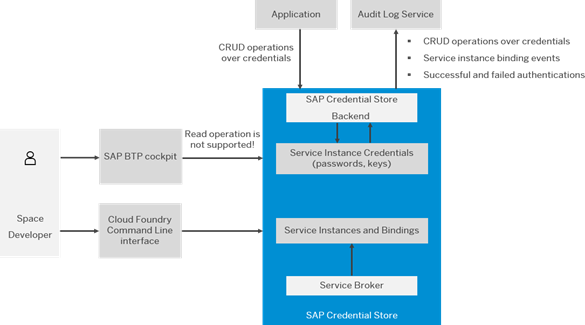
1. Developer Creates the Service:
The Space Developer uses the SAP BTP cockpit or the Cloud Foundry CLI to create a Credential Store service. They can create and bind it to applications, but they cannot view stored secrets in the cockpit.
2. Service Broker Sets Everything Up:
When the developer creates the service, the service broker in SAP automatically provisions the Credential Store instance and manages all bindings.
3. Instance and Bindings Are Created:
Next, the Credential Store creates a service instance and records which applications are bound to it. This is how applications gain permission to use the Credential Store.
4. Secrets Are Stored Securely:
Passwords, API keys, certificates, and other secrets are stored in an encrypted, protected layer. Only applications can access them – not developers through the UI.
5. Backend Handles All Secret Operations:
The Credential Store backend manages all operations, including creating, updating, deleting, and reading secrets. All secret operations are processed through this backend.
6. Applications Access Secrets via Secure API:
Applications retrieve secrets using mutual TLS (mTLS) and use certificates from their service bindings to securely access the Credential Store API.
7. Audit Logs Track Every Action:
Every important activity – such as reading a secret, creating a secret, or failing to authenticate – is recorded in the Audit Log Service for security tracking.
Security at Rest and In Transit with SAP Credential Store
SAP Credential Store ensures the protection of sensitive credentials both at rest and in transit through multiple layers of encryption and secure communication protocols.
- Security at Rest:
All secrets stored in the SAP Credential Store – including passwords, keys, and certificates – are encrypted at rest using strong, multi-version cryptographic keys. This means that even if the underlying storage is accessed, the data remains encrypted and unreadable without proper authorisation.
- Security in Transit:
Credentials are accessed by applications via a secure REST API over mutual TLS (mTLS). This ensures that all data transmitted between the application and the Credential Store is encrypted end-to-end, preventing eavesdropping, tampering, or man-in-the-middle attacks.
Together, these two principles form the foundation of a defence-in-depth security model, ensuring that secrets remain protected both at rest and in transit.
Audit Logs in Action: Enhancing Cybersecurity Posture
SAP Credential Store maintains detailed audit logs for every secret-related operation, providing cybersecurity teams with full visibility into credential access and usage. Below is a sample view of an audit log dashboard from SAP BTP.
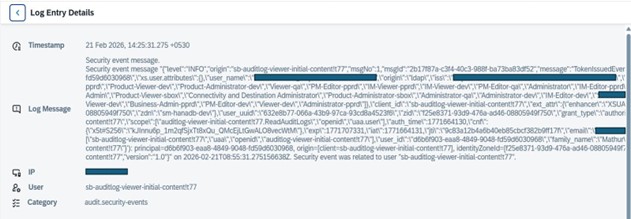
What This Audit Log Reveals:
| Log Field | Value in
Screenshot |
What It Means | Security Insight |
|
Timestamp |
21 Feb 2026,
14:25:31.275 +0530 |
The exact moment the event occurred | Establishes incident timeline. Events at unusual times (e.g., 3 AM vs. 2 PM) may indicate suspicious activity. |
|
IP Address |
[Redacted – Internal IP] |
Source of the request |
Confirms whether the request came from the corporate network. External or unexpected IPs could indicate a breach attempt. |
|
User/Client |
sb-auditlog-viewer-initial-content!t77 | Application/service accessing logs | Tracks which apps have audit access. Unused or unknown apps should be reviewed for potential misuse. |
|
Event Type |
TokenIssuedEvent |
User/app received access token | Critical for monitoring access. Unexpected token issuance may indicate account compromise or misconfigured apps. |
| Log Level | INFO | Severity of event | INFO = normal activity. WARNING/ERROR levels require immediate investigation. |
| Authentication Method |
origin: “ldap” |
How the user logged in | LDAP indicates corporate credentials. Unexpected methods or sources can signal credential abuse. |
|
User Identity |
[Redacted – User Email] | Specific user who performed the action | Links actions to a particular individual, essential for accountability and forensic analysis. |
|
Message ID |
2b17f87a-c3f4-40c3-988f-ba73ba83df52 | Unique event identifier | Used for tracking, referencing, and correlating events in audits and investigations. |
|
Version |
1.0 |
Log format version |
Ensures that log parsing tools correctly interpret the data; outdated or inconsistent versions may cause gaps in monitoring. |
How Cybersecurity Experts Leverage Audit Logs
- Real-Time Threat Detection:
Unusual access patterns – such as repeated failed authentication attempts or access from unauthorised IPs – can be flagged immediately for investigation.
- Forensic Analysis:
In the event of a security incident, logs provide a trail of who accessed which secret, when, and from where, enabling rapid root cause analysis.
- Compliance Reporting:
Logs can be exported for compliance audits (e.g., SOC2, GDPR, ISO 27001), demonstrating that secret management policies are enforced and monitored.
By integrating SAP Credential Store audit logs with SIEM (Security Information and Event Management) tools, organisations can automate alerting, correlate events, and strengthen their overall security posture.
Benefits of Using SAP Credential Store – Summary
Implementing SAP Credential Store for secret management in your applications provides several advantages over traditional methods, such as environment variables:
Enhanced Security
- Secrets are encrypted both at rest and in transit.
- Developers cannot access stored secrets directly, reducing the risk of accidental exposure.
Centralised Secret Management
- All credentials, keys, and certificates are managed in one secure location.
- Secrets can be rotated centrally without needing to redeploy applications.
Fine-Grained Access Control
- You can control which applications have access to which secrets.
- Multi-version keys and keyrings allow secure management of cryptographic materials.
Compliance and Auditability
- Every action – creating, updating, or accessing a secret – is recorded in audit logs.
- This provides transparency and supports regulatory or internal compliance requirements.
Secure Application Integration
- Applications retrieve secrets using mutual TLS (mTLS), ensuring encrypted, authenticated communication.
- Service keys enable secure access for external applications or applications in other spaces without exposing sensitive information.
Seamless Multi-Environment Support
- Works across Cloud Foundry and Kyma environments.
- Service instances can be shared between spaces or subaccounts, improving flexibility and scalability.
How Developers Use SAP Credential Store in Their Applications
SAP Credential Store provides language-agnostic APIs that can be used across different development platforms to securely retrieve and manage credentials. Examples include:
Java Applications
- Java apps can use REST calls to fetch secrets from SAP Credential Store.
- Secure connections are established using mutual TLS (mTLS) from the service binding.
- Credentials retrieved can be used for database connections, external API calls, or messaging services like SAP ANS.
Node.js Applications
- js apps can securely call the Credential Store API to retrieve secrets at runtime.
- Supports storing JSON-based keyrings or tokens for multiple external services.
Python Applications
- Python applications can integrate SAP Credential Store with libraries like requests or HTTPS for secure secret retrieval.
- Useful for scripts, automation tasks, or data pipelines that require credentials.
Other Platforms
- Any platform that can make HTTPS calls and handle certificates can integrate with SAP Credential Store.
- The service key or binding certificate ensures secure, authenticated access.
Real-Time Usage in SAP Credential Store
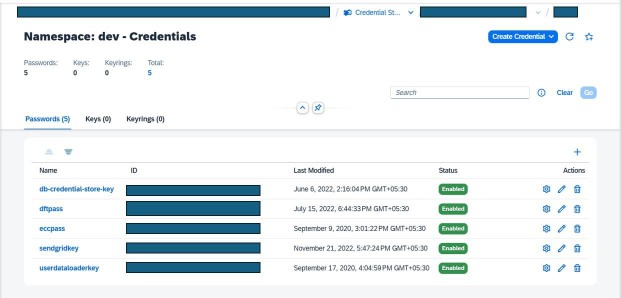
Based on this, the SAP Credential Store (namespace: dev) contains five enabled password-type credentials used by applications in the development environment. Each credential (such as database access, DfT integration, SendGrid email, and data loader keys) is securely stored with a unique ID and centrally managed through SAP BTP. This enables applications to securely access sensitive information at runtime without hardcoding secrets, improving security, maintainability, and compliance.
How On Device Solutions Uses SAP Credential Store to Secure User Credentials
On Device Solutions customers often need to securely manage credentials when building alerting workflows with the SAP Alert Notification service (SAP ANS) and other services. SAP Credential Store enables this by providing:
Secure access to API keys and tokens
Applications can securely retrieve credentials for Microsoft Teams, Slack, SMS gateways, or email services at runtime without hardcoding secrets.
Reliable alerting on system events
Using stored credentials, applications can trigger notifications for integration failures, runtime errors, or workflow events, ensuring that stakeholders are promptly informed.
Centralised management of multiple alerting channels
Instead of manually updating API keys across multiple applications, SAP Credential Store enables centralised storage, rotation, and management, reducing operational risk.
Audit and compliance for alerting operations
Every secret retrieval and access is logged, helping organisations maintain compliance when sending critical alerts to end users.
Take control of your application security with SAP Credential Store.
Get in touch with On Device Solutions here to design and implement a secure, scalable credential management solution tailored to your organisational needs.